
Manage client projects and email history in Gmail
Keep client conversations, tasks, contacts, notes and custom fields together in a Talvu project without moving your emails.
In this guide
Create and find a project
- Choose Projects → New Project, enter a clear name and save.
- Use the search field to find a name, status or associated contact.
- Open the sort control beside search to order the list, including Most notes. Use the visibility control to include or hide finished work.
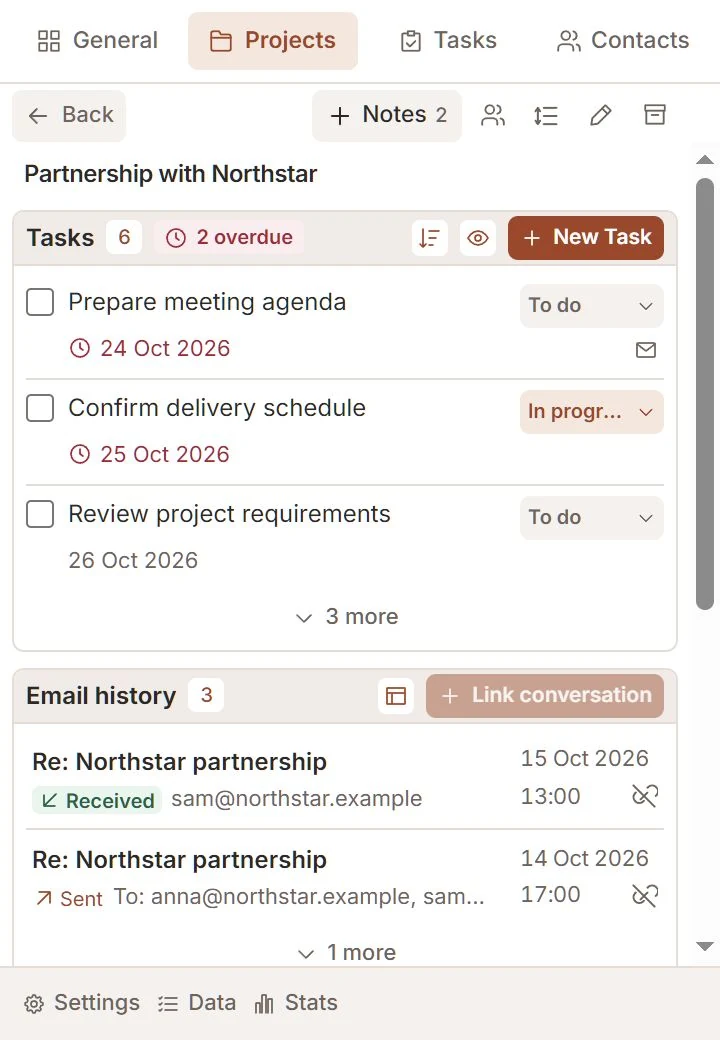
Projects may have the same name. Their names stay as entered; Talvu does not append a date or identifier. The note icon shows a count when saved notes exist.
Link a Gmail conversation
- Open the relevant Gmail email and the project it belongs to.
- Choose Link conversation in the project's Email history block.
- Open a history row to return to the saved message. In conversation view, Talvu opens the thread and locates that message.
Linking associates the whole conversation, including eligible replies. A project can contain several conversations. Unlinking in history affects the CRM association, not the emails in Gmail.
Keep the project up to date
- Change the project status as work progresses; edit the project name when needed.
- Use Manage contacts to choose the people connected to the work.
- Create custom fields in Settings, then add the relevant fields and values to the project.
Archive preserves the project and its notes. Deleting a project requires confirmation and removes its CRM associations and notes. It never deletes Gmail messages or your external Google contacts.
Work from the project
- Choose New Task to record a next action linked to the project.
- Open Notes to add or review the project's shared pool of notes.
- Use the project's layout controls to arrange tasks, email history, fields and automatic linking for your workflow.
When the open conversation belongs to this project, a new task also bookmarks its latest email. Outside conversation view, it bookmarks the current email. The project relationship and email bookmark are separate.